Showing posts with label direct entry. Show all posts

Tuesday, July 9, 2019

Federal University Wukari Post UTME/DE Admission Form 2019/2020

Federal University Wukari, FUWUKARI Post UTME and direct entry [DE] Admission Form for the academic session of 2019/2020 is officially on sale.

This is to notify all UTME and Direct Entry Candidates who chose Federal University Wukari as their first and second choices for admission in the 2019/2020 session to log into Federal University Wukari Portal: (www.fuwportal.edu.ng) for online registration.

Note that UTME candidates are required to score at least 160 and above, while Direct Entry Candidates should obtain GCE A/L, IJMB, Advance NABTEB, and Credit at NCE and ND (excluding University Diploma).
On the home page of the Federal University Wukari Portal website, click on 2019/2020 Post-UTME Screening Procedure.

Method of Application 

All candidates are advised to click on Pre-Admission Screening Instructions and carefully read the Registration Instructions.
  1. Type in your JAMB Registration Number and SURNAME in the boxes provided. Carefully type in your JAMB Registration Number as any error committed will not allow your details to be displayed.
Thereafter,
  • Actual Registration fee for each candidate is N2, 000 only excluding bank charges.
  • UTME candidates should click on the Get Details button for your JAMB information;
  • DE candidates should click OK button on the dialog box displayed and enter their names; and
  • Click on Make Payment link to go to WEBPAY page. Note: UTME Candidates who are qualified for the courses originally chosen can proceed to make payment by supplying the required information.
  1. Make Payment
  • Select your ATM card type (e.g. Verve or Master Card)
  • Enter your Card Number
  • Enter Card Expiry Date and the card CVV2  (the 3 digits on the reverse side of the card and lastly enter your card pin; and
  • Then click on Pay.
Please note:  (Do not refresh your browser while the process is going on to avoid multiple deductions from your account. If nothing is displayed after 10 minutes, close the browser and restart).
  1. After Login, click on Continue Registration Link on the main menu.
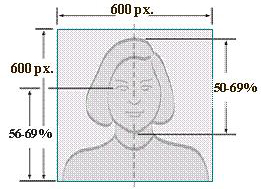
  2. Fill in your other bio-data and necessary details truthfully on the webpage. All candidates should upload their Passports by clicking on Browse button and select your picture. Your Passport must not be more than 25KB.

PASSPORT SPECIFICATION
      • Acceptable format is JPEG.
      • Picture must be digital passport photograph.
      • Resolution must be at least 200 DPI.
      • Dimension should not be less than 600 × 600 pixels.
      • Each photograph should capture the head and top of the shoulders so that the face takes up to 70-80% of the photograph.
      • Show the eyes looking directly at the camera.
      • Show skin tone naturally.
      • Have a uniform red background.
      • Maximum of 25KB.
Wukari Picture specification
  1. On completion of bio-data, click on Next Step button then click OK on the message dialog box.
  2. All Direct Entry (DE) candidates should complete the programme of choice and click on Save then click OK on the message dialog box.
  3. On completion of choice of Institution click Next Step button.
  4. For Direct Entry (DE) candidates;
    • Direct Entry candidates are required to select their Highest Academic Qualification(s) from the drop down and click on Save. On the dialog box click OK;
    • To add more Higher Academic Qualifications click on qualifications drop down to select your additional qualifications, click on save; and
    • Click on Next Step.
  1. All candidates (UTME and DE) are required to supply their O' level (O/L) details as follows:
  • Pick Number of sitting(s) by clicking on the drop-down button
  • Enter all the required O' level (O/L) details; Pick as applied in your result; and
  • Click on Submit button then click OK on the message dialog box.
  • Automatic disqualification at any stage of result falsification
  1. Click Print Tab to print out the following:
  • Post-UTME Screening Registration form;
  • Payment Receipt.
Note: All candidates are expected to be at the screening centre an hour before their scheduled time with the above printouts and be decently dressed
Thank you for choosing Federal University Wukari.
Please note that wrong entries will automatically disqualify a candidate.

For further enquiries contact: pumte2019@fuwukari.edu.ng

Monday, July 1, 2019

Federal University of Technology Akure Post UTME/DE Admission Form 2019/2020


The Federal University of Technology, Akure, (FUTA) Computer-Based Post-UTME screening exercise for admission into ALL COURSES/PROGRAMMES for the 2019/2020 Academic session will commence on Tuesday, 30th July and end on Friday, 2nd August, 2019.

REGISTRATION: MONDAY, 1ST JULY TO FRIDAY, 26TH JULY, 2019.

ELIGIBILITY:   Candidates who scored a minimum of 180 in the 2019 UTME conducted by the Joint Admissions and Matriculation Board (JAMB) and Direct Entry (DE) candidates who made the Federal University of Technology, Akure (FUTA) their First Choice Institution are eligible for the screening.  In addition, each candidate must possess at least five (5) credit passes including English Language and Mathematics at not more than two (2) sittings.  Candidates who do not participate in the Post-UTME screening will not be considered for admission.  FUTA will not consider candidates with “Awaiting Results”.  Candidates MUST have at least a pass in physics to qualify for admission into any programme in FUTA

SCREENING FEE:  is Two Thousand Naira (N2, 000.00) only payable at any bank through REMITA.

METHOD OF APPLICATION:   Candidates are required to:
  1. Visit the University website (www.futa.edu.ng) for information
  2. Login with their UTME Number
  3. Generate RRR, make PAYMENT on REMITA platform and COFIRM the payment
  4. Complete and submit the University Post-UTME Application form online; and
  5. Print out a copy.

REGISTRATION PROCEDURE: The Registration Form is mandatory for all eligible candidates to complete for the screening exercise.  Please note that the candidate’s UTME Registration Number and the Full Names (as it is on JAMB Slip) be correctly provided at the point of payment and registration.

After payment, each candidate should visit the University’s website (www.futa.edu.ng) and complete an online Registration Form.  The completed Form should be printed for the candidate’s use. 

UPLOADING OF O’LEVEL RESULTS: All affected candidates are to submit their SSCE/NECO results online through the University’s website (www.futa.edu.ng) from Monday, 1st July to Tuesday, 20th August, 2019. Candidates are to note that the deadline for submission of their O’ level results would NOT be extended; and any candidate who failed to upload his/her results would NOT be considered for admission by the University.


SCREENING SCHEDULE FOR 2019/2020 ADMISSIONS EXERCISE

DAY
DATE
SCHOOL(S)
1.
Tuesday, 30th July, 2019
School of Agriculture & Agricultural Technology (SAAT), School of Environmental Technology (SET), School of Earth and Mineral Sciences (SEMS), School of Health & Health Technology (SHHT)
2.
Wednesday, 31st July, 2019
School of Engineering & Engineering Technology (SEET)
3.
Thursday, 1st August, 2019
School of Computing (SOC) and School of Sciences (SOS)
4.
Friday, 2nd August, 2019
DIRECT ENTRY/MOP-UP.

ALSO NOTE THAT:
(i)   All candidates should bring along the following items to the screening venue:
       (a)  Depositor’s copy of Bank Teller indicating payments as appropriate;
      (b)  JAMB UTME Notification of Results/Registration slips;
      (c)  Printed copy of the completed FUTA Post-UTME Online Registration Form;
      (d)  Print-out of REMITA payment receipt (collected from the Bank) and
      (e)  One passport photograph.
       (f)   Candidates who would like to have a feel of CBT Practice Module should visit FUTA WEBSITE. Even though this is OPTIONAL, it is highly recommended to enable candidates get acquainted with the processes of the exercise.

(ii)  The venue of the screening exercise is the FUTA Digital Resource Centre, “Obanla Campus”,
       The Federal University of Technology, Akure.

(iii)  Candidates are NOT allowed to bring cell phones, IPad, Walkman, wrist watches, sun glasses
        or any other electronic gadget and extraneous materials into the screening hall.

(iv)    For more information or clarification or other issues, candidates can visit the
        University website www.futa.edu.ngor call 08085976967, 08068209911 and
        08118770353

NOTE:  Any UTME candidate who fails to present himself/herself for the Computer-Based Screening Exercise will NOT be considered for admission by the University.